Your Bankruptcy Court Date: How to Attend Your Zoom 341 Meeting of Creditors

Published
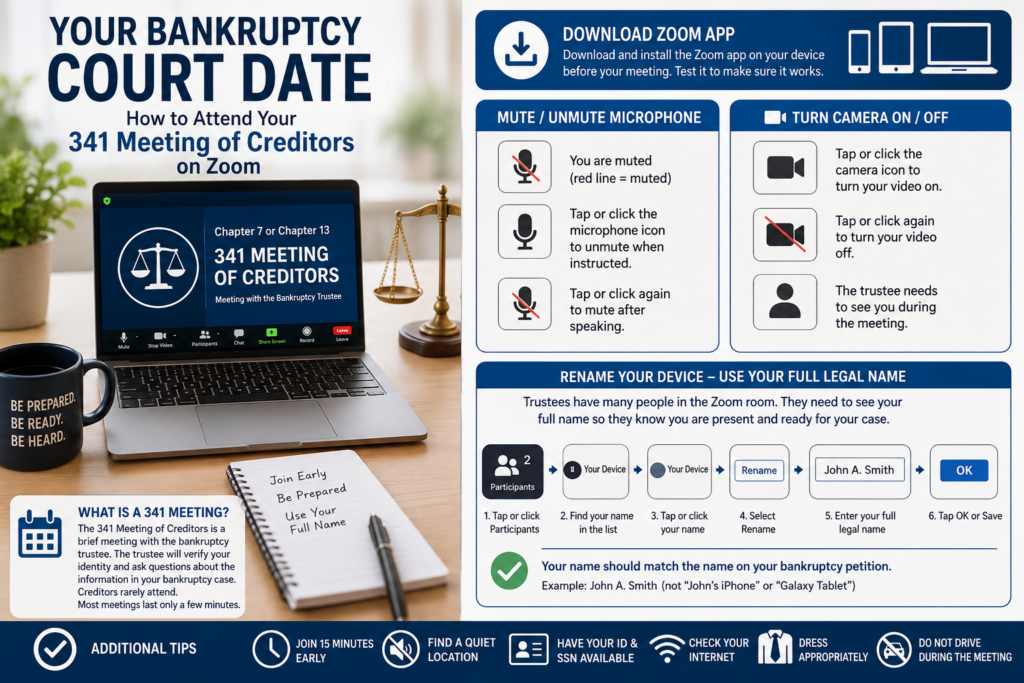
One of the most common questions we receive from bankruptcy clients is, “When is my court date?”
In a Chapter 7 or Chapter 13 bankruptcy case, your required court appearance is called a 341 Meeting of Creditors. While many people still think they must appear in a courtroom before a judge, that is no longer the case for most bankruptcy filers in the Eastern District of Michigan and many other jurisdictions across the country.
Today, bankruptcy 341 meetings are generally conducted through Zoom video conferencing, allowing debtors to attend from the comfort of their home, office, or another quiet location.
What Is a 341 Meeting of Creditors?
The 341 Meeting of Creditors is a brief hearing conducted by the bankruptcy trustee assigned to your case. The trustee will verify your identity and ask a series of questions under oath regarding the information contained in your bankruptcy petition.
Despite its name, creditors rarely attend these meetings. Most meetings last only a few minutes.
Prepare Before the Meeting
To avoid last-minute technical issues, we recommend:
Download the Zoom App Before Your Meeting
While Zoom can sometimes be accessed through a web browser, the safest option is to download and install the Zoom application on your device before your scheduled meeting. Once downloaded, be sure to Grant or Allow Zoom to used your camera and microphone.
You can install Zoom on:
- Smartphones
- Tablets
- Laptop computers
- Desktop computers
Download the app at least a day before your meeting and test it to make sure it works properly.
How to Mute and Unmute Your Microphone
When you first enter the Zoom meeting, your microphone should generally remain muted until your case is called.
Look for the microphone icon at the bottom of your screen.
- If there is a red line through the microphone, you are muted.
- Tap or click the microphone icon to unmute yourself when instructed by the trustee.
- Tap or click it again to mute yourself after speaking.
Keeping your microphone muted helps eliminate background noise and allows the trustee to conduct meetings efficiently.
How to Turn Your Camera On and Off
The trustee must be able to see you during the meeting.
Look for the camera icon on your Zoom screen.
- Tap or click the camera icon to turn your video on.
- Tap or click it again to turn your video off.
Before the meeting begins, make sure your camera is working and positioned so your face can be clearly seen. Most trustees want you to have the camera off until your case is called.
Use Your Full Legal Name
One of the most important things you can do is make sure your Zoom display name matches the name on your bankruptcy case.
Trustees often have dozens of people waiting in the virtual meeting room. They need to quickly identify who is present and ready for their case to be called.
If your device displays:
- “John’s iPhone”
- “Galaxy S25”
- “Walter’s Laptop”
- “Mom’s Tablet”
the trustee may not know who you are.
Instead, your display name should be your full legal name, such as:
John A. Smith
or
Mary Jones
How to Rename Yourself in Zoom
After joining the Zoom meeting:
- Tap or click Participants.
- Find your name in the participant list.
- Tap or click your name.
- Select Rename.
- Enter your full legal name exactly as it appears on your bankruptcy petition.
- Click OK or Save.
Once renamed, the trustee can easily see that you are present and ready for your case to be called.
Additional Tips for a Successful Zoom Bankruptcy Hearing
- Join the meeting at least 15 minutes early.
- Use a quiet location free from distractions.
- Have your government-issued photo ID available.
- Have your Social Security card or approved proof of Social Security number available.
- Make sure your device is fully charged or plugged in.
- Test your internet connection beforehand.
- Dress appropriately and treat the meeting as you would an in-person court appearance.
- Do not drive during the meeting.
We Help Clients Prepare
At the Law Offices of Walter Metzen, we make sure every client understands exactly what to expect before their 341 Meeting of Creditors. We provide detailed instructions, Zoom links, and preparation guidance so that the process goes smoothly and stress-free.
If you are considering filing Chapter 7 or Chapter 13 bankruptcy and have questions about the process, contact our office for a free consultation.